
You publish a page, Google visits it, and then nothing happens. Search Console shows the dreaded status — crawled currently not indexed. The page exists, Googlebot has read it, and Google has decided not to store it.
Most advice treats this as a technical bug you can patch. In most cases, it isn’t. Google crawled the page, evaluated it, and concluded it wasn’t worth a spot in the index. That’s a judgment, and judgments have reasons.
This guide explains what those reasons are, how to figure out which one applies to your pages, and which fixes actually move pages into the index instead of wasting your time.
What Crawled Currently Not Indexed Actually Means
Google’s pipeline has two separate stages that people often merge into one. Crawling is Googlebot fetching your page and reading its content. Indexing is Google deciding to store that page in its database so it can appear in search results.
A page can pass stage one and fail stage two. That’s exactly what the crawled but not indexed status describes. It’s different from “discovered – currently not indexed,” where Google knows the URL exists but hasn’t fetched it yet. If your page shows the crawled version, access was never the problem. Google saw everything and still said no.
That distinction matters because it changes where you look. Discovered-not-crawled points to crawl budget and server issues. Crawled-not-indexed points, in the large majority of cases, to how Google evaluated what it found.
Why This Problem Is Bigger Than Most Site Owners Realize
If you assumed indexing was close to automatic, the data says otherwise. An IndexCheckr study of 16 million pages found that 61.94% of them were not indexed by Google.
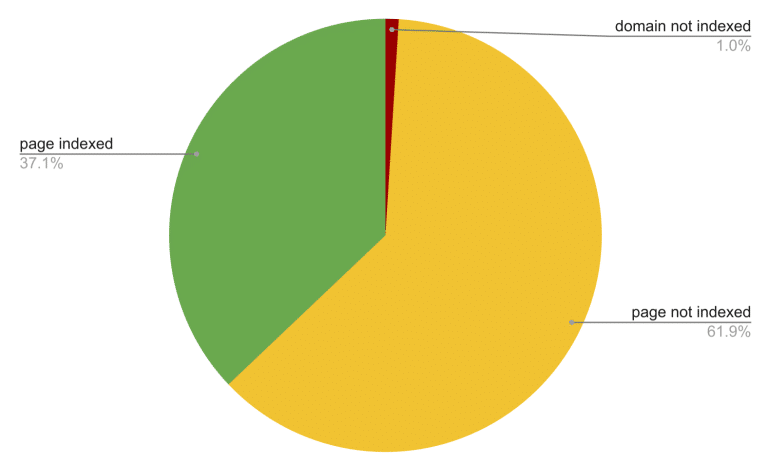
Source: IndexCheckr
The index has become selective, and selectivity keeps increasing as the volume of published content explodes.
The reason is simple economics. Storing, processing, and ranking a page costs Google resources. With AI tools letting anyone publish thousands of pages a day, Google can’t afford to index everything it crawls. It indexes what it predicts will be useful to searchers and skips the rest.
So the real question behind every crawled currently not indexed report isn’t “what’s broken?” It’s “why did Google predict this page wouldn’t be useful?”
The Real Reasons Google Crawls But Doesn’t Index
Quality is the dominant cause, and it isn’t close. Indexing Insight analyzed 1.7 million pages across 18 websites and found that 88% of not-indexed pages were excluded because of quality issues, not technical ones.
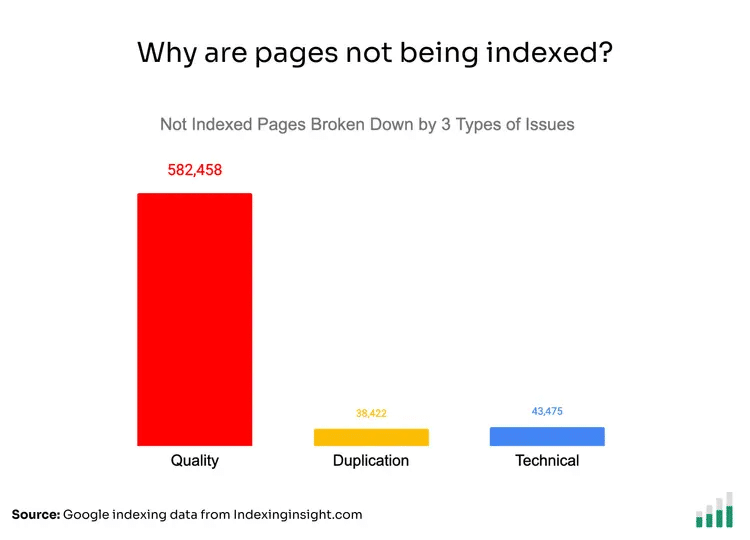
Source: Indexing Insight
The pattern held for big brands and small sites alike.
Within that quality bucket, a few specific situations come up again and again.
- Thin or shallow content: The page technically covers the topic but adds nothing beyond what’s already indexed a thousand times.
- Near-duplicates: Google found your page too similar to another page, on your site or elsewhere, and kept the other one.
- Weak internal linking: The page sits three or four clicks deep with almost nothing pointing to it, which tells Google your own site doesn’t consider it important.
- Site-wide quality drag: Google evaluates domains, not just pages. A site with thousands of low-value pages gets a lower indexing appetite across the board, so even decent new pages struggle to get in.
- No external signals: Pages on sites with little authority and no backlinks give Google no outside evidence that anyone values the content.
Notice what’s missing from that list — sitemap problems, missing schema, and most of the technical items people check first. Those matter for discovery. They rarely explain why a crawled page stays out.
How to Diagnose Your Own Pages
Before fixing anything, work out which situation you’re in. Open the Page Indexing report in Search Console and export the affected URLs. Then look for patterns instead of inspecting pages one by one.
If the excluded URLs are mostly tag archives, filtered category pages, or auto-generated variants, that’s index bloat, and Google is doing you a favor by skipping them. If they’re pages you genuinely care about, blog posts, product pages, service pages, ask three questions about each group.
First, does the page say anything a searcher can’t already get from the current top 10? Second, how many internal links point to it, and from which pages? Third, does the page target a query anyone actually searches? A page written for a keyword with no demand often stays unindexed simply because Google has no query to serve it for.
The pattern across your answers usually points to one dominant cause, and that’s the one worth fixing.
Fixes That Actually Work
Once you know the cause, the fixes are straightforward.
- Make the page worth indexing. Add original information — first-hand experience, data, examples, or depth the current results lack. If two or three of your pages cover the same topic, consolidate them into one strong page and redirect the rest. One substantial page beats three thin ones in almost every indexing decision.
- Link to it like it matters. Add internal links from your most-crawled, highest-traffic pages, using descriptive anchors. Pages linked from the homepage or top posts get recrawled and re-evaluated far faster than orphaned ones.
- Build external signals. A few relevant backlinks change Google’s math on a page and on the whole domain. Earning quality backlinks for key pages is often the difference for sites whose content is fine but whose authority is thin. If the whole domain lacks authority, a broader link building strategy fixes the indexing appetite problem at its root.
- Cut the dead weight. If a large share of your site is thin, outdated, or duplicated, prune it. Noindex or remove pages that serve nobody. Sites that reduce index bloat regularly see their remaining pages get indexed faster, because the domain’s overall quality signal improves.
Conclusion
The crawled currently not indexed status feels like a technical error, and that framing is exactly why so many sites never solve it. Google isn’t failing to index your page. It’s declining to, based on an assessment of value.
Once you accept that, the path is clear. Make the page more valuable than what’s already ranking, connect it properly inside your site, and give Google outside evidence that the domain deserves attention. Pages that earn indexing tend to keep it. Pages that get forced in through tricks fall right back out.
FAQs
1. How long does crawled currently not indexed take to resolve?
After meaningful improvements, expect anywhere from a few days to several weeks. Google needs to recrawl the page and re-run its evaluation. Pages with strong internal links from frequently crawled pages get re-evaluated fastest. If nothing changes after six to eight weeks, the improvements probably weren’t enough.
2. Does this status hurt the rest of my site?
The status itself doesn’t, but the underlying cause can. If large numbers of pages are excluded for quality reasons, Google’s assessment of your whole domain suffers, which can slow indexing and hold back rankings for pages that are indexed. That’s why pruning low-value pages often helps the entire site.
3. Can backlinks get a page indexed?
They help a lot. A backlink from a crawled, trusted page gives Google both a new discovery path and evidence that someone independent values your content. Links won’t rescue a genuinely thin page, but for solid content on a low-authority domain, they’re often the missing signal.
4. Should I delete pages that won’t get indexed?
Delete or noindex them only if they serve no user and no business purpose. If the topic matters, improving or consolidating beats deleting every time. Removing large amounts of thin content helps sites suffering from index bloat, but removing useful pages just because Google is slow costs you future traffic.
5. Is crawled currently not indexed the same as a penalty?
No. Penalties are manual actions that appear in a dedicated Search Console report. This status is an algorithmic decision about individual pages. Nothing is flagged against your site, and pages can move into the index at any time once Google’s evaluation of them changes.