Your backlink report looks healthy. New placements keep appearing, the total climbs, and your provider points to another successful month. Meanwhile, organic visits are falling, and the pages that used to bring enquiries have become noticeably quieter. Getting more backlinks while losing traffic leaves you questioning whether the campaign is working at all.
A closer look at your existing links helps, but your backlink report cannot explain everything happening in search. So here are reasons why traffic is falling despite more backlinks.
Your Backlink Count Is Growing Without Adding Useful Ranking Value
Backlinks support search performance, but a larger total does not guarantee more visitors. You still need pages that rank for relevant searches and persuade people to click. Start by checking whether the links behind your growing total represent useful new references.
Several links from one website, duplicated pages, or low-value placements can increase the count without demonstrating stronger performance. Look at the actual source pages, destination URLs, and acquisition methods. A report listing domains alone leaves out the information you need to assess the campaign.
Also check lost links alongside new ones. Your total could rise while an important editorial reference disappears. If older artificial links previously contributed ranking credit, Google can neutralize that credit. Newly acquired links do not automatically replace that lost benefit.
So ask for a report showing newly gained and lost links by target page. Review the context around each placement and the pages receiving attention. If most activity supports an old blog post while your service pages lose traffic, the campaign report and the traffic report are measuring different parts of your website.
Competing Pages Answer the Search Better Than Yours
A well-linked page still has to satisfy the person searching. If your content leaves important questions unanswered, competing pages have an opportunity to serve those readers better. Google’s core-update guidance explains that ranking assessments consider how helpful and reliable the available content is.
For example, your article about choosing accounting software might list general benefits. Competing pages could provide current pricing, screenshots, integration limitations, and recommendations for different business sizes. More backlinks will not add those missing details to your article.
Run a focused content review on the pages responsible for the decline. Compare their main queries with the results now appearing above them. Check whether searchers want a product category, a comparison, a tutorial, or a specific answer. Then assess whether your page delivers that experience.
Write down the exact information a reader must leave your page to find. Add useful evidence, correct outdated details, and improve navigation where the answer is difficult to locate. Avoid padding the article simply because a competitor has a higher word count. If losses overlap a core update, use Google’s recommended comparison dates before drawing conclusions.
Search Results Are Sending Fewer Clicks to Websites
Your organic positions can remain fairly stable while your click-through rate falls. Searchers encounter answers, maps, shopping features, and other information before deciding whether to visit a website. Your page’s position alone does not describe everything competing for their attention.
In a 2025 analysis using U.S. browsing data from March, Pew Research Center found that visits to Google results pages with AI summaries led to clicks on traditional results 8% of the time, compared with 15% without summaries.
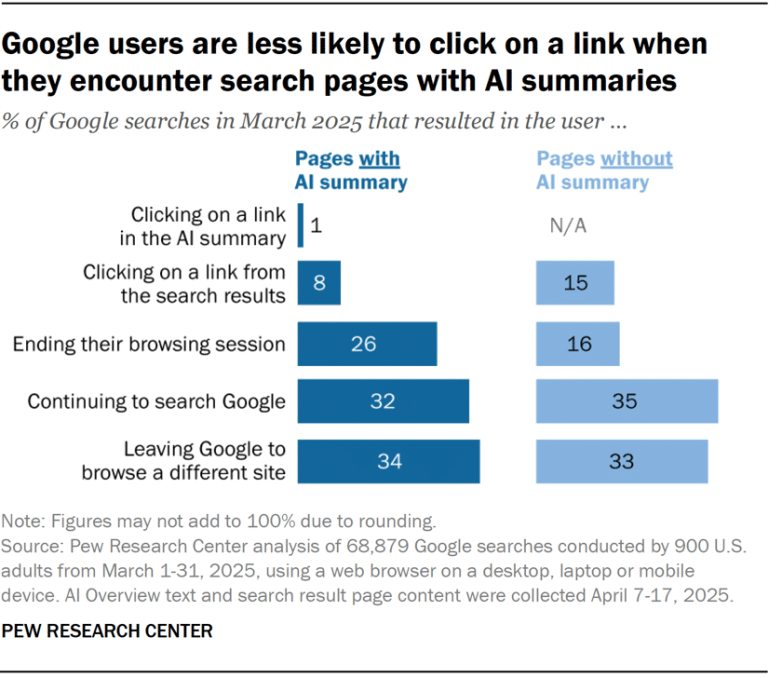
Source: Pew Research Center
The finding shows an association across those searches; it does not measure the impact on your particular website.
To investigate whether you’re receiving fewer clicks for similar visibility, compare the same page-and-query combinations in Search Console. Keep country and device consistent. Look for falling click-through rates alongside relatively steady positions and impressions, then inspect the actual results for those searches.
Technical Problems Are Removing Important Pages From Search
A page cannot benefit fully from promotion if Google cannot properly access and index it. An accidental noindex directive, an incorrect redirect, or a canonical pointing to another URL can undermine the page you’re trying to promote.
These problems often appear after website changes. A redesign could alter product URLs, a template update could affect indexing settings, or a hosting problem could prevent reliable access. Buying more backlinks will not repair any of those faults.
Use Search Console’s Page Indexing report to look for patterns among affected pages. Then inspect representative URLs and compare Google’s indexed information with a live test. Review crawl access, indexing permission, and the selected canonical using Google’s URL Inspection guidance. A successful live test alone does not guarantee indexing or rankings.
Fewer People Are Searching for Your Topics
Your website could retain its positions while the audience for its keywords becomes smaller. Seasonal products, event-related pages, discontinued software, and once-popular topics all experience changes in demand. Even a strong backlink profile cannot guarantee traffic from searches people no longer perform.
Consider a retailer whose winter heating guides receive fewer visits during warmer months. A campaign earning links to those guides does not remove their seasonality. Comparing a peak month with a quieter one would give you a misleading impression of the campaign’s performance.
Check whether impressions fell for queries whose positions remained reasonably stable. Compare the same period in previous years where data is available, and review interest in those topics using Google Trends. Remember that Trends shows relative interest, not exact search volume.
Wrap Up
Before paying for more backlinks, identify what your site is losing: ranking visibility, clicks, indexed pages, or search demand. Each problem requires a different response, and a growing link total cannot tell you which correction to make.
Start with the pages that contribute enquiries and work from their actual performance. Use those findings to set priorities and assess placement quality before approving further outreach.
FAQs
1. Can More Backlinks Increase Traffic Without Improving Rankings?
Yes. A reader who follows a link from another website creates a referral visit, independent of your Google position. Check referral traffic separately from organic search so you can see which channel the placement supports.
2. Why Is My Domain Rating Increasing While Organic Traffic Falls?
Domain Rating describes your backlink profile according to a third-party tool. Organic traffic also depends on rankings, demand, and clicks. An improvement in that score does not establish that your important pages are attracting more visitors.
3. How Do I Know Whether the Drop Is a Tracking Problem?
Compare analytics trends with Search Console clicks for the same website and period. If analytics drops sharply while search clicks remain stable, inspect recent tag, consent, and reporting changes. The two systems measure different things, so their totals will not match exactly.
4. Should I Stop Link Building Until Traffic Recovers?
Pause any placement method you cannot evaluate or justify. Continue diagnosing the affected pages before committing further budget. A useful editorial opportunity still deserves consideration, but it should support a clear objective while you address the traffic problem.
5. Should I Delete Pages That Have Backlinks but Little Traffic?
Assess their purpose first. A page could support customers, attract referral visits, or contain research others reference. Low organic traffic alone does not justify deletion; decide whether to improve, retain, or consolidate it based on its actual usefulness.